The Life Cycle of a Hydrographic Marine Chart

Hydrographic charts are an essential source of data for MaxSea marine charts in order to guarantee the quality of this basic onboard tool for safe sailing while at sea.

Did you ever wonder how MapMedia marine charts are produced? Although the charts are edited by MapMedia, this company uses hydrographic charts collected and then updated by hydrographic offices all around the world. Here, we explain the steps of this process.

To draw up a chart, first we must compile data, edit it and then keep it continuously updated.

The data collection

The hydrographic office first acquires bathymetric, topographic and sedimentological surveys as well as satellite imagery and any additional data needed.

Production of the chart

Once all this data has been compiled and verified, a paper chart is drawn up, following very precise specifications in order to comply with sailing requirements in each specific area.  All the necessary information for sailing and safety are provided on the paper chart. The chart must be both precise and easy to read so that you can sail safely.

This first date of publication is always included on the hydrographic chart. We have included images from the French Hydrographic Office to to explain each point in this post.
Image

The MaxSea TimeZero App is available now!

Chart Updates

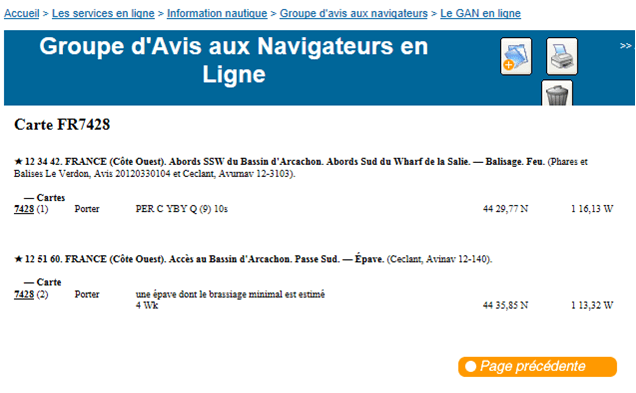
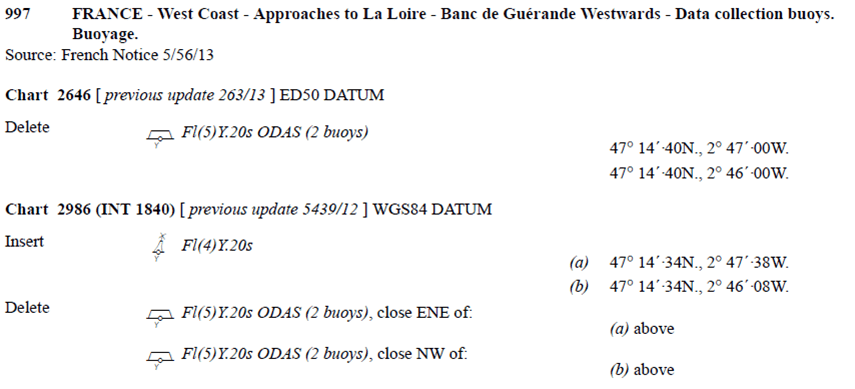
Every week, minor or major corrections are reported on the hydrographic chart and then released via the « Groupe d’Avis aux Navigateurs GAN » or “Notice to Mariners – NTM”.
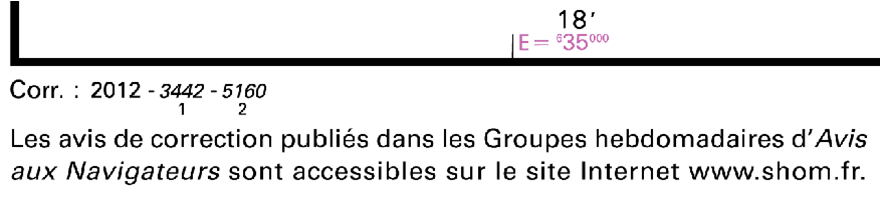
Hydrographic chart NTM

–

Hydrographic chart NTM

–

Hydrographic chart NTM

–

Hydrographic chart NTM

–

Hydrographic chart NTM

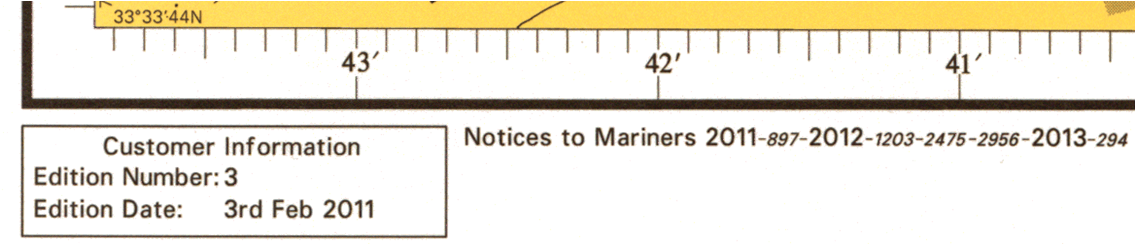
In the case of minor corrections that are not essential for sailor safety, the marine chart is printed again. The date of this new print is mentioned on the chart. A chart can also be printed again if out of stock. The date of the reprint is mentioned on the chart.

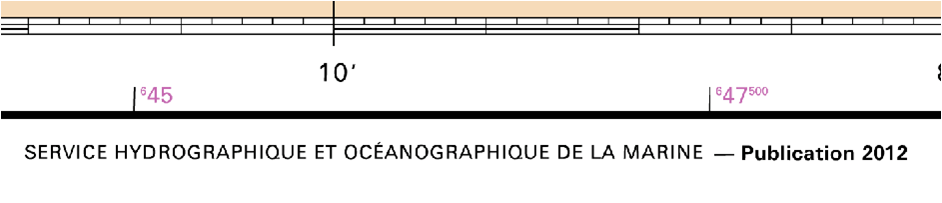
When major modifications occur, the hydrographic chart is reprinted. A new publication number and date are added to the chart:

A hydrographic chart publication number and date

–

A hydrographic chart in Raster format from the SHOM

New chart  SHOM N° 7428

A hydrographic chart from the SHOM

MapMedia compares marine charts and different catalogues and selects the best chart for a specific location in order to provide the most reliable information for safe sailing.

—————–

Don’t forget to download this useful guide on how to choose the right marine chart for you:

5 Tips for Choosing the Best Nautical Chart

All Jeppesen chart update

All Jeppesen nautical charts will be updated in June and made available in our chart catalog as follows:

  • Canada, North America, Caribbean & South America chart zones: June 10th
  • Europe chart zones: June 14th
  • ROW chart zones: June 24th

Jeppesen Chart update - June 2013

Here are some examples of these updates:

Old/New Mediterranean and Black Sea Mega Wide Chart 

OLD-NEW Mediterranean and Black Sea chart

Old/New Central America and Caribbean Wide Chart 

OLD-NEW Central America and Caribbean

These updates include the latest charts and NTM provided by our data providers.

You can see more examples of this charts update release in our Facebook album or Google+ Photos section.

MaxSea Support and Training Services

After receiving several requests from MaxSea users, we have decided to launch new Support and Training services, which aim to provide a more advanced level of customer service at very affordable prices. However, we will continue to provide standard technical support for free.

MaxSea Support Services

MaxSea Training Services

Our users can now take advantage of the following options:

Software installation: A MaxSea Support Technician remotely takes control of your computer in order to install your software for you. You can stay in the comfort of your own living room while this service is being carried out.

Chart installation: A MaxSea Support Technician remotely takes control of your computer in order to install all the charts that you have purchased – raster/vector charts, 3D data and high resolution satellite photos.

Software and chart installation: If you would like both your software and charts to be installed by a MaxSea representative, this option offers all the convenience at a reduced overall price.

1H Remote training: This option is for customers who wish to receive one-on-one training on the basic, most frequently-used features in MaxSea software. Again, a technician will remote into your computer and show you how to use each feature while explaining it to you over the phone.

3H Remote training: For customers who would like to receive a more in-depth one-on-one training in a range of more advanced topics such as radar/ sounder integration.

2 day In-Person course: This course is a fully-immersive 2 day programme offered in the Barcelona MaxSea office with our highly-trained technicians. You will have the opportunity to learn about all of the software functionalities and also ask any questions that you may have. These courses are carried out in very small groups so that you receive full attention.

—

Whether you are a beginner or just in need of a little extra help, MaxSea has a Support and Training Service solution for you. For more information, please see https://www.maxsea.com/store#services

More information at http://www.maxsea.com/support/support_and_training_services

Purchase one of these services at https://www.maxsea.com/store#services

Where does the name MaxSea come from?

MacSea testingBrice Pryszo was born in Bayonne, a city in the south west of France, on March 12th, 1952. From an early age he discovered the joys of sailing in the Basque Country.

Driven by this passion, he participated in the creation of a new naval architecture specialization during his time spent studying at  École des Beaux-Arts (School or Fine Arts) in Paris (1972)

Upon completion of his studies, back in his native Basque country, he began his professional career by designing his first boat. The advent of the Personal Computer in 1984 made Brice aware of the huge technological future potential. He decided to embark on a new professional adventure involving the area of Maritime Navigation and Information.  He subsequently set up the company “Informatique et Mer” (literally “Computers and Sea”) on January 3, 1985.

Macintosh Lisa used for developmentThe company’s first investment was the purchase of the third Macintosh 128k ever sold in France, in the spring of 1984 (in addition to the Macintosh Lisa used for development). These revolutionary machines allowed the company to develop the software prototype MACSEA to be tested aboard “Crédit Agricole” in 1985. It was subsequently tested by Philippe Poupon and Eric Tabarly. The MACSEA software gradually became a reference in the sector of high-level competitive sailing.

Following this early success, the company began to focus on the commercial fishing industry by working with the fishermen of Port Hendaye (including Mr. Blanchot). The challenge of putting a computer on a fishing vessel in 1986 was huge! “Computers and Sea” succeeded to do so and of course, continued to grow by equipping more and more vessels abroad (especially in Northern Europe).

Third Macintosh 128k ever sold in FranceBetween 1996 and 1999, MACSEA abandoned the Mac platform, deciding to develop for the dominant Microsoft Windows platform instead. The company then became known as MaxSea.

“Computers and Sea” again changed its name to “MaxSea International” in 2001 as it began to expand globally and to have a name that was more “exportable”.

In 2013, MaxSea returned to its first love, Apple, by launching their first iPad application for MaxSea.

The MaxSea TimeZero App is available now!And so, the adventure continues…

Europe, Mediterranean and Transat Raster Charts Update

The following European, Mediterranean and Transatlantic Raster charts have been updated and will be available in May on our Chart Catalogue:

Raster Chart update - April 2013

These updates include the latest charts and NTM provided by our data providers.

Here are some examples of the improvements introduced to these MapMedia Raster charts:

Old/New West Europe chart

Old-new  West Europe Raster chart (MWRMEW46MAP5.1)
Old-new West Europe Raster chart (MWRMEW46MAP5.1)

Old/New Mediterranean Sea – West chart

Old-new Mediterranean Sea - West chart (WRMEM32MAP3.1)
Old-new Mediterranean Sea – West chart (WRMEM32MAP3.1)

You can see more examples of this charts update release in our Facebook album or Google+ Photos section.

MaxSea TimeZero Spring 2013 Releases

This Spring, we’released 2 new software versions, 1 new module and a software upgrade. Here’s the summary:

MaxSea TimeZero Recreational v2

  • Windows 8 CompatibilityMaxSea TimeZero Recreational v2
  • Advanced planning according to tides and tidal currents
  • Major improvements to the presentation of AIS information
  • New Progress Bar (Date/Time)

Click here for more information

—

Advanced Routing Module

This module allows advanced sailors to manually control and adjust the weather fileAdvanced Routing Module parameters in order to get more accurate results. It also introduces the variability notion, helping the skipper to identify the particular moments in the navigation where strategy choices are critical.

Click here for more information

—

MaxSea TimeZero SportFishing

  • Real time PBG dataMaxSea TimeZero SportFishing
  • User-friendly interface
  • Seamless NavNet 3D connection
  • Free weather forecasts and oceanic data display directly on navigation charts to help you to detect the best fishing areas
  • Includes all of the nautical charts for one MapMedia Wide area
  • Built-in AIS/ARPA function

Click here for more information

—

MaxSea TimeZero Racing

  • Professional user interfaceMaxSea TimeZero Racing
  • Free weather forecast service
  • AIS/ARPA built-in function
  • Transat Mega Wide chart area
  • France and United Kingdom current zones
  • NN3D and FAR 2xx7 advanced compatibility
  • Advanced Routing Module: This NEW module brings many new features which complete our basic Routing Module (reliability index, polar % and configuration of the weather files over time)
  • PosReport Module: It allows racers tracking during an ocean race

Click here for more information

—

And last but not least…

The MaxSea TimeZero App is available now!

Software Update: MaxSea TimeZero Navigator & Explorer v2

MaxSea TimeZero v2

This week, the version 2* of our Recreational Sailing range has been released. This new MaxSea TimeZero version 2 includes many new features and enhancements such as:

Windows 8 Compatibility
MaxSea TimeZero v2 is compatible with Windows 8

New Time Bar
MaxSea TimeZero introduces a new time bar which is available in the Planning work space at the bottom of the screen.

Better AIS data display
Version 2 brings major improvements to the presentation of AIS information.

Perform advanced planning according to tides and tidal currents
MaxSea TimeZero V2 now allows you to calculate the best departure time in order to arrive with high tide.

MaxSea TimeZero v2 New Time Bar
NEW feature: MaxSea TimeZero v2 Time Bar

Click here to read more about this release.

If you wish to know more about our recreational range, here are MaxSea TimeZero Navigator and MaxSea TimeZero Explorer product pages.

*This is a Paid Update, free for customers who bought their license after December 6, 2012.

US NOAA and Canada charts update

The following US and Canada charts have been updated and are available as of March 15th, 2013 on our Chart Catalogue:

Chart update - March 2013

These updates include the latest charts and NTM provided by our data providers.

Here’s te coverage of the new Canada Mega Wide Raster chart:

MWRMNA80MAP1.1 Canada Raster Chart
NEW Canada Mega Wide Raster Chart (MWRMNA80MAP1.1)

Here are some examples of the improvements introduced to the Raster charts:

Old/New NOAA Raster Charts (MWRUSAMAP6.1)
Old/New Canada - North BC-Baranof I. MapMedia Raster Chart (WRMNA914MAP3.1)
Old/New Canada – North BC-Baranof I. MapMedia Raster Chart (WRMNA914MAP3.1)

The new NOAA Vector Charts & USACE Inland Charts include the following S-57 Inland rivers charts from the Army Corps of Engineers (USACE)*:

  • Allegheny River, Mile 0-7
  • Arkansas River, Mile 0-444
  • Atchafalaya River, Mile 0-118
  • Black Warrior-Tombigbee Rivers, Mile 0-393
  • Cumberland River, Mile 0-381
  • Green River, Mile 1 -108
  • Illinois River, Mile 0-322
  • Kaskaskia, Mile 2 to 36
  • Kanawha River, Mile 0-91
  • Lower Mississippi River, Mile 236-951
  • Missouri River, Mile 0-735
  • Monongahela River, Mile 0-128
  • Ohio River, Mile 0-981
  • Ouachita River, Mile 5 to 338
  • Red River, Mile 0-237
  • Tennessee River, Mile 0-652 (Including Tellico, Hiwassee, Clinch and Emory Rivers)
  • Tennessee-Tombigbee Waterway, Mile 218-450
  • Upper Mississippi River, Mile 0-866
Vector Charts and USACE Inland Charts MWVSUSAMAP7.1

*The bridges information requires the latest MaxSea Professional version in order to be displayed. 

All Jeppesen and French Polynesia & New Caledonia Raster Charts Update

The French Polynesia & New Caledonia Raster chart and ALL (79 areas) our Jeppesen charts have been updated (version 4.1) and are available as of January 31st, 2013 through our chart catalogue:

Jeppesen and Raster chart update - January 2013

Please note that 8 Jeppesen Wide chart areas have been removed (in red in the image above) and will be covered by other Wide areas in the next release.

These updates include the latest charts and NTM provided by our data providers.

Here are some examples of the improvements introduced to the French Polynesia & New Caledonia Raster chart:

French Polynesia area

French Polynesia & New Caledonia Raster Chart Update (WRMPC02MAP2.1)
Old/New French Polynesia Raster chart (WRMPC02MAP2.1)

New Caledonia area

French Polynesia & New Caledonia Raster Chart Update (WRMPC02MAP2.1)
Old/New New Caledonia Raster chart (WRMPC02MAP2.1)

Understanding TIMEZERO nautical chart references

If you’ve ever wondered what is the logic behind the chart references found on our online nautical chart catalogue, here’s the answer.

All our charts present the same information when you make a search on our online nautical chart catalogue: name of the zone (Baltic Sea and Denmark in the example below), number of files that you must download in order to install the chart (8 in the example) and chart reference (WVJENM299MAP13.1):

Timezero chart files download

If you already have the chart reference, you can type it in the search bar (green rectangle in the image above). If you put at least 3 characters, our online nautical chart catalogue will display all the chart zones that start with that 3 characters, that’s called stemming.

chart catalog search

But be careful, old versions of some chart zones may have a different syntax.

Take the UK-Ireland Raster chart for example:

  • First version reference was R28P-MAP/01
  • Second version WR28MAP2.1
  • Latest version WRMEW28MAP7.1

TIMEZERO online nautical chart catalogue only displays the latest version of all charts, so if you try to find your old UK-Ireland chart by typing “R28P-MAP/01″ you’ll never find it!

Here’s how TIMEZERO charts are structured:

MaxSea zone naming

SIZE = W wide or MW MegaWide (do you know the difference?)

TYPE = V vector or R raster (an old and interesting debate among sailors)

PROVIDER = M MapMedia  J C-MAP (previously by Jeppesen)  N Navionics  S S-57

REGION CODE = first 2 characters

AF Africa

AN Asia North

AS Asia South

AU Australia

EM Europe Mediterranean

EN Europe North

EW Europe West

IN Indian Ocean

ME Middle East

NA North America

SA South America

PC Pacific Ocean

CODE NUMBER = 000

To find a chart zone in our website, you have 3 options:

  • Use the filters on the left side of the online nautical chart catalogue
  • Type the chart’s reference in the search bar of the catalogue
  • Check our charts list which is categorized by region, type, size, provider and name

Now, if you still don’t find what you’re looking for, try TIMEZERO search bar located at the  top-right corner across the entire website:

search bar mytimezero.com

Finally, take the time to read these few tips on how to choose the best nautical chart for you, it can help you make a decision!